General Page
Use the General page of the Group Service editor to configure general node properties.
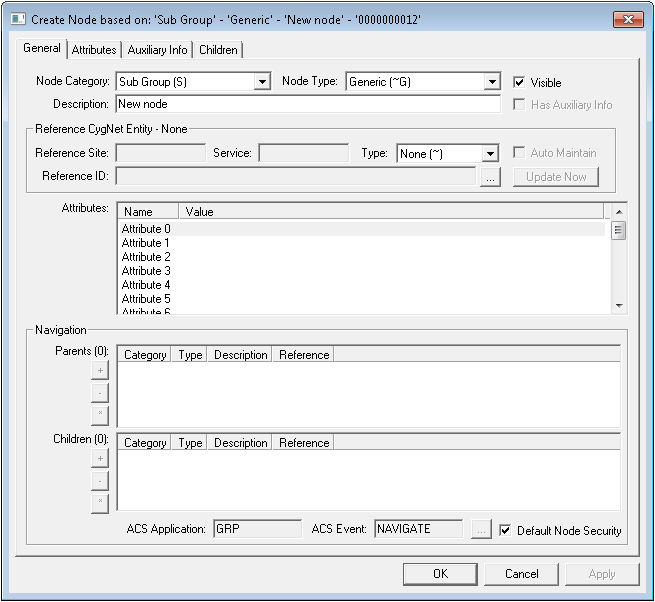
General Page Properties
The following table lists and describes the General page properties of the GRP editor.
| Property | Description |
|---|---|
| General | |
|
Node Category |
A node category indicates the position and role of a node within a hierarchy. It can be a system- or user-generated, internal node reference. Node categories are as follows:
For more information, see Node Category, Type, and Attribute Identifier. |
|
Node Type |
A node type is a description of an individual node. It can be a system- or user-generated, internal node reference. Node types are as follows:
For more information, see Node Category, Type, and Attribute Identifier. |
|
Visible |
Select to make this node visible in the GRP. |
|
Description |
Free-form text box used to define the node. |
|
Has Auxiliary Info |
Select to indicates whether auxiliary information exists for this node. You can access the auxiliary data on the Auxiliary Info page for this node. |
| Reference CygNet Entity - [Type] | |
|
Reference Site |
Defines the site for a reference entity associated with a node. |
|
Service |
Defines the reference service for a reference entity associated with a node. Typically a UIS. For instance, if the node references a remote device facility, the Service is a UIS. |
|
Type |
Defines the reference Type for a reference entity associated with a node. Select the appropriate option from the Type drop-down menu. Reference types are as follows:
|
|
Auto Maintain |
Obsolete |
|
Reference ID |
Defines the ID of the item referenced by a reference entity. Available selections depend upon the Type chosen. |
|
Update Now |
Click to update the reference entity information after you've made reference entity settings changes. |
|
Attributes |
List of all standard attributes for the node. Attributes depend on settings made in the Reference CygNet Entity - [Type] area. For more information, see Node Category, Type, and Attribute Identifier. |
| Navigation | |
|
Parents |
A parent in a parent - child hierarchy is a superior entity. For example, a view is a parent of a level. This table lists the parent(s) for the selected node. Double-click a parent to change the properties of the property sheet to those of the parent. Command options for this field are as follows:
|
|
Children |
A child in a parent - child hierarchy is an inferior entity. For example, a level is a child of a view. This table lists the child(ren) for the selected node. Double-click a child to change the properties of the property sheet to those of the child. Command options for this field are as follows:
|
|
ACS Application |
Security application for the selected node. |
|
ACS Event |
Security event for the selected node. |
|
Default Node Security |
Check to accept the default security for the selected node. |
 If active, enables you to add a child.
 If active, enables you to remove a child.
 If active, opens the selected child node's General record.

